What different ‘Administrator Types’ are available and what do they mean?
There are three different types of administrators available on Bookteq: Owner, User & Read-only.
Each administrator has their own set of permissions that allow them to carry out certain actions on the Bookteq platform.
Let’s take a look at each of them and see what they mean!
Owners
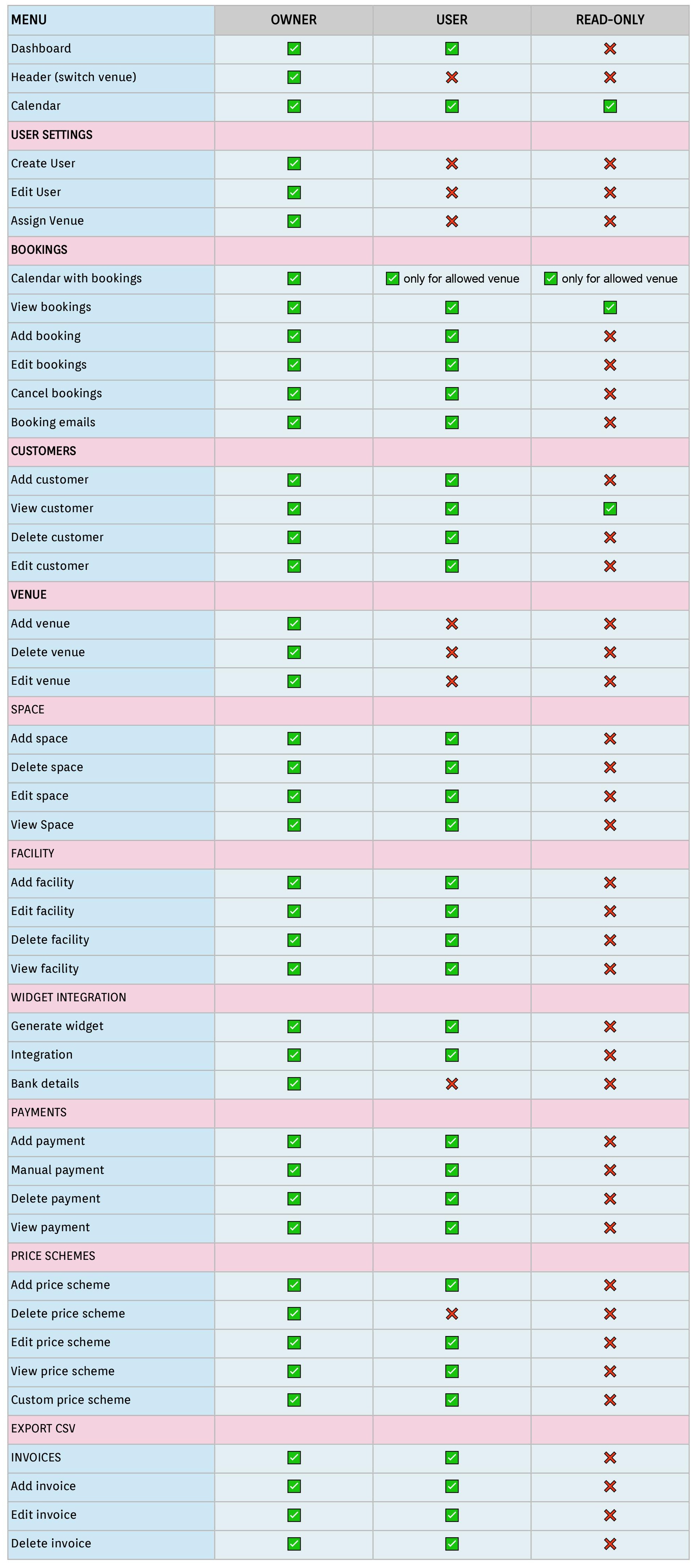
With Owner access, you have complete control over your venue account, from adding new administrators, venues and bookings, to managing your Bookteq billing and Stripe payments.
Owners can add and assign administrator roles, change permissions, and even create additional Owners if more than one is required to manage your venues. From your Bookteq overview scroll down to Account and select Administrators from the dropdown menu. You can then either add a new administrator or select an existing administrator you want to give Owner status to.
Users
User access allows you to create, view and amend bookings, as well as add new customers, spaces and facilities for the venue(s) assigned to them by the account Owner.
They are also able to add payment requests, manage invoices and send payment links for the venue(s) via the Bookings tab.
User access doesn’t allow you to create new ‘Administrators' or edit permissions, nor can they add or amend venue information.
Read-only
With Read-only access, you can share your calendar with additional administrators in your workspace easily and securely. Read-only administrators can view bookings through the Calendar and Bookings tab but not edit, move or delete any booking information. They are also unable to send payment links or invoices.
Find out more about Read-only access and how it’s used, here.
Overview of different administrator roles in the table below